Monday, 17 February 2014

Consuming ASP.NET Web API OData Batch Update From JavaScript

Consuming OData with plain JavaScript is a bit painful, as we would require handling some of the low-level conversions. datajs is a JavaScript library that simplifies this task.

datajs converts data of any format that it receives from the server to an easily readable format. The batch request sent is a POST request to the path /odata/$batch, which is made available if batch update option is enabled in the OData route configuration.

As seen in the last post, a batch update request bundles of a number of create put and patch requests. These operations have to be specified in an object literal. Following snippet demonstrates it with a create, an update and a patch request:


var requestData = {
    __batchRequests: [{
        __changeRequests: [
            {
                requestUri: "/odata/Customers(1)",
                method: "PATCH",
                data: {
                    Name: "S Ravi Kiran"
                }
            },
            {
                requestUri: "/odata/Customers(2)"
                data: {
                    Name: "Alex Moore",
                    Department: "Marketing",
                    City:"Atlanta"
                }
            },
            {
                requestUri: "/odata/Customers",
                method: "POST",
                data: {
                    Name: "Henry",
                    Department: "IT",
                    City: "Las Vegas"
                }
            }
        ]
    }]
};

Following snippet posts the above data to the /odata/$batch endpoint and then extracts the status of response of each request:

OData.request({
    requestUri: "/odata/$batch",
    method: "POST",
    data: requestData,
    headers: { "Accept": "application/atom+xml"}
}, function (data) {
    for (var i = 0; i < data.__batchResponses.length; i++) {
        var batchResponse = data.__batchResponses[i];
        for (var j = 0; j < batchResponse.__changeResponses.length; j++) {
            var changeResponse = batchResponse.__changeResponses[j];
        }
    }
    alert(window.JSON.stringify(data));
}, function (error) {
    alert(error.message);
}, OData.batchHandler);


Happy coding!

Sunday, 16 February 2014

Batch Update Support in ASP.NET Web API OData

The ASP.NET Web API 2 OData includes some new features including the support for batch update. This features allows us to send a single request to the OData endpoint with a bunch of changes made to the entities and ask the service to persist them in one go instead of sending individual request for each change made by the user. This reduces the number of round-trips between the client and the service.

To enable this option, we need to pass an additional parameter to the MapODataRoute method along with other routing details we discussed in an older post. Following statement shows this:


GlobalConfiguration.Configuration.Routes.MapODataRoute("ODataRoute", "odata", model,new DefaultODataBatchHandler(GlobalConfiguration.DefaultServer));


I have a CustomerController that extends EntitySetController and exposes OData API to perform CRUD and patch operations on the entity Customer, which is stored in a SQL Server database and accessed using Entity Framework. Following is code of the controller:

public class CustomersController : EntitySetController<Customer, int>
{
    CSContactEntities context;

    public CustomersController()
    {
        context = new CSContactEntities();
    }

    [Queryable]
    public override IQueryable<Customer> Get()
    {
        return context.Customers.AsQueryable();
    }

    protected override int GetKey(Customer entity)
    {
        return entity.Id;
    }

    protected override Customer GetEntityByKey(int key)
    {
        return context.Customers.FirstOrDefault(c => c.Id == key);
    }

    protected override Customer CreateEntity(Customer entity)
    {
        try
        {
            context.Customers.Add(entity);
            context.SaveChanges();
        }
        catch (Exception)
        {
            throw new InvalidOperationException("Something went wrong");
        }

        return entity;
    }

    protected override Customer UpdateEntity(int key, Customer update)
    {
        try
        {
            update.Id = key;
            context.Customers.Attach(update);
            context.Entry(update).State = System.Data.Entity.EntityState.Modified;

            context.SaveChanges();
        }
        catch (Exception)
        {
            throw new InvalidOperationException("Something went wrong");
        }

        return update;
    }

    protected override Customer PatchEntity(int key, Delta<Customer> patch)
    {
        try
        {
            var customer = context.Customers.FirstOrDefault(c => c.Id == key);

            if (customer == null)
                throw new InvalidOperationException(string.Format("Customer with ID {0} doesn't exist", key));

            patch.Patch(customer);
            context.SaveChanges();
            return customer;
        }
        catch (InvalidOperationException ex)
        {
            throw ex;
        }
        catch (Exception)
        {
            throw new Exception("Something went wrong");
        }
    }

    public override void Delete(int key)
    {
        try
        {
            var customer = context.Customers.FirstOrDefault(c => c.Id == key);

            if (customer == null)
                throw new InvalidOperationException(string.Format("Customer with ID {0} doesn't exist", key));

            context.Customers.Remove(customer);
            context.SaveChanges();
        }
        catch (InvalidOperationException ex)
        {
            throw ex;
        }
        catch (Exception)
        {
            throw new Exception("Something went wrong");
        }
    }
}


Let’s use the batch update feature in a .NET client application. Let’s try adding a new customer and update an existing customer in the Customers table. Following code does this:

Container container = new Container(new Uri("http://localhost:<port-no>/odata"));

var firstCustomer = container.Customers.Where(c => c.Id == 1).First();
firstCustomer.Name = "Ravi Kiran";
container.UpdateObject(firstCustomer);

var newCustomer = new Customer() { Name="Harini", City="Hyderabad", Department="IT"};
container.AddToCustomers(newCustomer);

var resp = container.SaveChanges(SaveChangesOptions.Batch);


The last statement in the above snippet sends a batch request containing two requests: one to add a new customer and one to update an existing customer. The update operation calls the patch operation exposed by the OData API.

In next post, we will see how to perform batch update in a JavaScript client.

Happy coding!

Monday, 27 January 2014

Creating a Todo List using Indexed DB and Angular JS

In last post, we saw how to use Indexed DB with promise API implemented inside the browsers. In this post, we will rewrite the same sample using Angular JS. So, instead of using promise API of the browser, we will use Angular’s $q, as it makes the data binding system happy. And instead of performing the CRUD operations on Indexed DB inside a revealing module, we will do it inside a factory.

Indexed DB is available to the global scope. This means, it is a property of the window object. The best practice to use it in a factory is through the $window object, as it is injectable and makes the factory testable. Following snippet shows first few statements of the factory:

var app = angular.module('indexDBSample', []);
app.factory('indexedDBDataSvc', function($window, $q){
  var indexedDB = $window.indexedDB;
  var db=null;
  var lastIndex=0;
  ....
  ....
  ....
});


We need to add methods to open DB, get todo items, add new item and delete an item just as we did in the last post. Logic in the methods remains the same, except usage of the promise.

The open method opens the database, checks for upgrade and handles the call back if it needs. It specifies the key property of the database while creating a new database.

var open = function(){
  var deferred = $q.defer();
  var version = 1;
  var request = indexedDB.open("todoData", version);
  request.onupgradeneeded = function(e) {
    db = e.target.result;
    e.target.transaction.onerror = indexedDB.onerror;
    if(db.objectStoreNames.contains("todo")) {
      db.deleteObjectStore("todo");
    }
    var store = db.createObjectStore("todo",
      {keyPath: "id"});
  };
  request.onsuccess = function(e) {
    db = e.target.result;
    deferred.resolve();
  };
  request.onerror = function(){
    deferred.reject();
  };
  
  return deferred.promise;
};


The getTodos method fetches all available items in the DB and resolves promise with the results once all results are obtained. The fetch operation is performed using a cursor request, which returns the items individually from the indexed DB.

var getTodos = function(){
  var deferred = $q.defer();
  
  if(db === null){
    deferred.reject("IndexDB is not opened yet!");
  }
  else{
    var trans = db.transaction(["todo"], "readwrite");
    var store = trans.objectStore("todo");
    var todos = [];
  
    // Get everything in the store;
    var keyRange = IDBKeyRange.lowerBound(0);
    var cursorRequest = store.openCursor(keyRange);
  
    cursorRequest.onsuccess = function(e) {
      var result = e.target.result;
      if(result === null || result === undefined)
      {
        deferred.resolve(todos);
      }
      else{
        todos.push(result.value);
        if(result.value.id > lastIndex){
          lastIndex=result.value.id;
        }
        result.continue();
      }
    };
  
    cursorRequest.onerror = function(e){
      console.log(e.value);
      deferred.reject("Something went wrong!!!");
    };
  }
  
  return deferred.promise;
};


The addTodo method generated the next value for the key column and adds it to the Indexed DB.

var addTodo = function(todoText){
  var deferred = $q.defer();
  
  if(db === null){
    deferred.reject("IndexDB is not opened yet!");
  }
  else{
    var trans = db.transaction(["todo"], "readwrite");
    var store = trans.objectStore("todo");
    lastIndex++;
    var request = store.put({
      "id": lastIndex,
      "text": todoText
    });
  
    request.onsuccess = function(e) {
      deferred.resolve();
    };
  
    request.onerror = function(e) {
      console.log(e.value);
      deferred.reject("Todo item couldn't be added!");
    };
  }
  return deferred.promise;
};


Finally, the deleteTodo method accepts value of key property of the item to be deleted and invokes the delete method of the store to delete the item.

var deleteTodo = function(id){
  var deferred = $q.defer();
  
  if(db === null){
    deferred.reject("IndexDB is not opened yet!");
  }
  else{
    var trans = db.transaction(["todo"], "readwrite");
    var store = trans.objectStore("todo");
  
    var request = store.delete(id);
  
    request.onsuccess = function(e) {
      deferred.resolve();
    };
  
    request.onerror = function(e) {
      console.log(e.value);
      deferred.reject("Todo item couldn't be deleted");
    };
  }
  
  return deferred.promise;
};


Implementation of the controller is pretty straight forward. The controller invokes the members of the factory and updates the data items that are used to bind data on the UI.

app.controller('TodoController', function($window, indexedDBDataSvc){
  var vm = this;
  vm.todos=[];
  
  vm.refreshList = function(){
    indexedDBDataSvc.getTodos().then(function(data){
      vm.todos=data;
    }, function(err){
      $window.alert(err);
    });
  };
  
  vm.addTodo = function(){
    indexedDBDataSvc.addTodo(vm.todoText).then(function(){
      vm.refreshList();
      vm.todoText="";
    }, function(err){
      $window.alert(err);
    });
  };
  
  vm.deleteTodo = function(id){
    indexedDBDataSvc.deleteTodo(id).then(function(){
      vm.refreshList();
    }, function(err){
      $window.alert(err);
    });
  };
  
  function init(){
    indexedDBDataSvc.open().then(function(){
      vm.refreshList();
    });
  }
  
  init();
});


The complete sample is available on this plunk: http://plnkr.co/edit/7oSOUHC9hSnD8d6COkSK?p=preview

Happy coding!

Sunday, 26 January 2014

Creating a Todo list using Indexed DB and Promise


What is Indexed DB

HTML5 brought lots of capabilities to the browsers including some storage APIs. One of the storage options available on browsers today is Indexed DB. As the name itself suggests, Indexed DB is much like a database, but it is meant to store JavaScript objects. Data in the Indexed DB is not relational; it just has to follow a definite structure.

The browsers support a number of APIs to help us interact with the Index DB. Details about all of the Indexed DB API can be found on the Mozilla Developer Network. Current implementation of the APIs by the browsers may not be perfect, as most of the APIs are still under development. But, the browsers have enough support now so that we can play around. Check caniuse.com to find if your browser supports Indexed DB.

As API of the Indexed DB says, all operations performed over Indexed DB are executed asynchronously. The operations don’t let the current thread processing to wait unless the operation is finished. Instead, we need to hook-up call backs to perform actions upon success or failure of the operation.

Promises in the browser

In the latest version of JavaScript, the language got built-in support for promises. This means, we don’t need to use any of the third party libraries to prettify the asynchronous code and keep it clean from nasty call backs. As Indexed DB works asynchronously, we can use promise API to make the Indexed DB operations cleaner. Very few of the browsers support the promise API as of now. Hopefully others will join the club soon.

Using the promise API is very easy. But you need to have a good understanding of what promises are before proceeding further. Following snippet shows how to use the promise API in an asynchronous function:


function operate(){
    var promise = new Promise(resolve, reject){
        if(<some condition>){
     resolve(data);
 }
 else{
     reject(error);
 }
    };
    return promise;
}


Success and failure callbacks can be hooked up to the promise object returned in the above function. Following snippet shows this:

operate().then(function(data){
    //Update UI
}, function(error){
    //Handle the error
});


Building a todo list app

Let’s start implementing a simple todo list using Indexed DB. To store the todo items in the Indexed DB, we need to create an object store. While creating, we need to specify the version of the DB and the key property. Any object inserted into the object store must contain the key property. Following code shows how to create a DB store:


var open = function(){
    var version = 1;
    var promise = new Promise(function(resolve, reject){
        //Opening the DB
        var request = indexedDB.open("todoData", version);      

        //Handling onupgradeneeded
        //Will be called if the database is new or the version is modified
        request.onupgradeneeded = function(e) {
            db = e.target.result;
            e.target.transaction.onerror = indexedDB.onerror;

            //Deleting DB if already exists
            if(db.objectStoreNames.contains("todo")) {
                db.deleteObjectStore("todo");
            }
            //Creating a new DB store with a paecified key property
            var store = db.createObjectStore("todo",
                {keyPath: "id"});
        };

        //If opening DB succeeds
        request.onsuccess = function(e) {
            db = e.target.result;
            resolve();
        };

        //If DB couldn't be opened for some reason
        request.onerror = function(e){
            reject("Couldn't open DB");
        };
    });
    return promise;
};


Now that the DB is opened, let’s extract all todo items (if exist) from it. The logic of fetching the items is conceptually similar to the way we do it with databases. Following are the steps:

  1. Open a cursor for the request to fetch items from lower bound
  2. The items will be returned one by one. Handle appropriate call back and consolidate all the values
Following code achieves this:

var getAllTodos = function() {
    var todosArr = [];

    //Creating a transaction object to perform Read/Write operations
    var trans = db.transaction(["todo"], "readwrite");
        
    //Getting a reference of the todo store
    var store = trans.objectStore("todo");

    //Wrapping all the logic inside a promise
    var promise = new Promise(function(resolve, reject){
        //Opening a cursor to fetch items from lower bound in the DB
        var keyRange = IDBKeyRange.lowerBound(0);
        var cursorRequest = store.openCursor(keyRange);

        //success callback
        cursorRequest.onsuccess = function(e) {
            var result = e.target.result;
                
            //Resolving the promise with todo items when the result id empty
            if(result === null || result === undefined){
                resolve(todosArr);
            }
            //Pushing result into the todo list 
            else{
                todosArr.push(result.value);
                if(result.value.id > lastIndex){
                    lastIndex=result.value.id;
                }
                result.continue();
            }
        };

        //Error callback
        cursorRequest.onerror = function(e){
            reject("Couldn't fetch items from the DB");
        };
    });
    return promise;
};


To add a new item to the todo list, we need to invoke the put method on the store object. As mentioned earlier, key property should be present and it should be assigned with a unique value. So, we calculate value of the next id and assign it to the object.
var addTodo = function(todoText) {
    //Creating a transaction object to perform read-write operations
    var trans = db.transaction(["todo"], "readwrite");
    var store = trans.objectStore("todo");
    lastIndex++;
        
    //Wrapping logic inside a promise
    var promise = new Promise(function(resolve, reject){
        //Sending a request to add an item
        var request = store.put({
            "id": lastIndex,
            "text": todoText
        });
            
        //success callback
        request.onsuccess = function(e) {
            resolve();
        };
            
        //error callback
        request.onerror = function(e) {
            console.log(e.value);
            reject("Couldn't add the passed item");
        };
    });
    return promise;
};


Finally, let’s delete todo item from the list. The logic remains quite similar to that of adding a new todo. The only difference is, we need just id of the item to be deleted.
var deleteTodo = function(id) {                                                                                     
    var promise = new Promise(function(resolve, reject){  
        var trans = db.transaction(["todo"], "readwrite");
        var store = trans.objectStore("todo");            
        var request = store.delete(id);                   
                                                          
        request.onsuccess = function(e) {                 
            resolve();                                    
        };                                                
                                                          
        request.onerror = function(e) {                   
            console.log(e);                               
            reject("Couldn't delete the item");           
        };                                                
    });                                                   
    return promise;                                       
};


Code of the complete sample is available at this plunk: http://plnkr.co/edit/aePFAaCucAKOXbb1qL85?p=preview

Happy coding!

Tuesday, 21 January 2014

SideWaffle and my Contribution to the Project

What is SideWaffle?

SideWaffle is a community driven project that adds new project templates, item templates and code snippets to Visual Studio 2012 and 2013. It is a Visual Studio extension, can be installed from extension manager on both Visual Studio 2012 and 2013. If you are a .NET developer and use Visual Studio for development (which is obvious :)), install this extension before proceeding further.

The project is started by a set of folks including some working at Microsoft web tools team and some of the respectable technology experts. But the project is open sourced on Github and accepts contributions from any community member. If you ever wanted to see some templates of your own choice in the dialog boxed of Visual Studio, but were not sure of how to do it (like myself), now SideWaffle provides you a way to create the template very easily and also share it with all the developers around the globe.

A glance at some of the templates and snippets

SideWaffle already includes a bunch of useful templates and snippets. Following are some of the item templates available. As you see, we have a set of handy templates available to create just what we used to from scratch using the default language-based templates in Visual Studio.


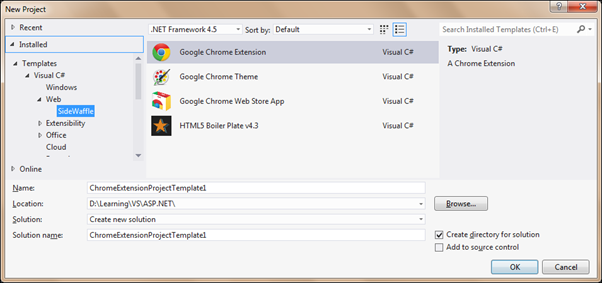
You can also create non-.NET projects like Chrome extension using a project template made available with SideWaffle.


My contribution

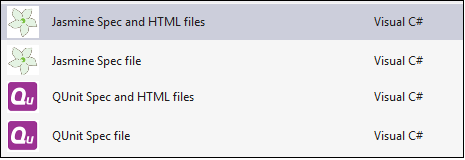
Over the past few days, I have been unit testing some Angular JS code. Creating the test spec files from scratch every time was not something I enjoyed. So, I wanted to see templates in the Add -> New Item dialog box of Visual Studio that creates a basic test skeleton on top of which I can write my tests. In the past, I have used Jasmine and QUnit for unit testing JavaScript code. So, I thought of contributing the templates to SiddeWaffle as testing JavaScript is becoming very popular these days. I forked the SideWaffle project on Github and my job of writing templates became easy with help of the video tutorial put up by Sayed on Youtube. I created the following four templates:

1. Jasmine Spec and HTML files: Adds a sample Jasmine spec file and the Jasmine HTML runner file 2. Jasmine Spec file: Adds a sample Jasmine spec file 3. QUnit Spec and HTML files: Adds a sample QUnit spec file and the QUnit HTML runner file 4. QUnit Spec file: Adds a sample QUnit spec file

I sent a pull request with the above templates and my changes were merged into the project. Now, I can’t wait to see my own templates under the SideWaffle tab:


You can do it too!

I have put together this blog post to let you know people like you and I can create our own template and share it with the entire community. Creating own item template in Visual Studio is painful, but SideWaffle’s build system makes this process very easy. Have a template that you want to share with everyone? Put it here!

Tuesday, 7 January 2014

Using Dependency Injection with ASP.NET Web API Hosted on Katana

Using Katana we can build a light-weight server to host an ASP.NET application, without needing IIS or System.Web. Katana has a nice support for hosting SignalR and Web API with very few lines of code. In a previous post, we saw how to self-host SignalR using Katana. In this post, we will see how easy it is to perform dependency injection on a self-hosted Katana application.

Open Visual Studio 2013 and create a new console application. Add following NuGet packages to the application:


  • Install-Package Microsoft.AspNet.WebApi.Owin
  • Install-Package Ninject


First package gets a bunch of packages for creating and hosting Web API. The second package installs the Ninject IoC container.

Add an API Controller to the application and change the code of the controller to:

public class ProductsController : ApiController
{
    IProductsRepository repository;

    public ProductsController(IProductsRepository _repository)
    {
        repository = _repository;
    }

    public IEnumerable<Product> Get() 
    {
        return repository.GetAllProducts();
    }
}

We need to inject instance of a concrete implementation of IProductRepository. We will do this using dependency injection. You can create the repository interface and an implementation class by your own.

To perform dependency injection with Web API, the WebApiContrib project has a set of NuGet packages, including one for Ninject. But the version of Web API it requires is 4.0.30319. As we are using VS 2013, the default version of Web API is 5.0.0.0. Installing this NuGet package may result into version compatibility issues. To avoid this issue, we can build the WebapiContrib.Ioc.Ninject project using VS 2013 or we can also copy the code of NinjectResolver class from the GitHub repo and add it to the console application.

In the Owin Startup class, we need to configure Web API and also tie it with an instance of NinjectResolver. Constructor of NinjectResolver accepts an argument of IKernel type. Kernel is the object where we define the mapping between requested types and types to be returned. Let’s create a class with a static method; this method will create the kernel for us. Add a class and name it NinjectConfig. Change code of the class as:

public static class NinjectConfig
{
    public static IKernel CreateKernel()
    {
        var kernel = new StandardKernel();

        try
        {
            kernel.Bind<IProductsRepository>().To<ProductRepository>();
            return kernel;
        }
        catch (Exception)
        {
            throw;
        }
    }
}

Now all we need to do is, configure Web API and start the server. Add a class, change the name as Startup and replace the code as:
public class Startup
{
    public void Configuration(IAppBuilder app)
    {
        var config = new HttpConfiguration();
        config.DependencyResolver = new NinjectResolver(NinjectConfig.CreateKernel());

        config.Routes.MapHttpRoute("default", "api/{controller}/{id}", new { id=RouteParameter.Optional });

        app.UseWebApi(config);
    }
}


Finally, start the server in Main method:
static void Main(string[] args)
{
    string uri = "http://localhost:8080/";

    using (WebApp.Start<Startup>(uri))
    {
        Console.WriteLine("Server started...");
        Console.ReadKey();
        Console.WriteLine("Server stopped!");
    }
}


Open a browser and enter the following URL:


http://localhost:8080/api/products


You should be able to see list of products returned from the repository class.

Happy coding!

Tuesday, 31 December 2013

Triggering Events in Angular JS Directive Tests

The best place to perform DOM manipulations in an Angular JS application is in a directive. Sometimes we handle events on the elements wrapped inside the directive to perform required action. The jQlite implementation in Angular JS provides enough APIs to handle these events in the body of the directives. We can use jQuery as well, if API exposed by jQlite is not enough.

One of the primary design goals of Angular JS is testability. Directives are testable too. Since we work directly on DOM with directives, testing becomes a bit tricky. One of such trickier part to test is event. Say, we have a directive that handles blur event on a text box:

app.directive('textBoxBlur', function($window){
  return{
    require:'ngModel',
    link: function(scope, element, attrs, ngModel){
      element.bind('blur', function(e){
        $window.alert("value entered: " + element.val());
      });
    }
  }
});

To call the DOM events manually, jQlite provides a handy method triggerHandler. It is similar to jQuery’s triggerHandler method. It can be fired using jQlite object of any element. Following statement shows this:
elem.triggerHandler('blur');

Since we have to do it repeatedly in tests, it is better to wrap it inside a reusable function as shown below:
changeInputValue = function (elem, value) {
    elem.val(value);
    elem.triggerHandler('blur');
};

Now the above function can be called from any test case to test behaviour of the blur event.
it('Should call alert on losing focus', function(){
  changeInputValue(form.find('input'), "Ravi");
  expect(windowMock.alert).toHaveBeenCalled();
});

Complete sample is available on plnkr: http://plnkr.co/edit/InkyGdIhZiwfe0NC4hyu?p=preview

Happy coding!

Monday, 30 December 2013

Self-Hosting ASP.NET SignalR Using Katana

With the recent release of ASP.NET, Microsoft added a new component, Katana. It is an implementation of OWIN (Open Web Interfaces for .NET) that provides a light weight alternative to create a .NET server quickly without needing any of the ASP.NET components or IIS. The server can be composed anywhere, even on a simple Console based application. For more information on Katana, read the excellent introductory article by Howard Dierking.

The project templates of ASP.NET that come with Visual Studio 2013 have some pieces of Katana also installed, as we saw some of them in my post on Identity system. It is used there to make the identity system available for across all flavours of ASP.NET.

Katana made the process of self-hosting ASP.NET Web API and SignalR very easier with its simple interface. Any Katana based application needs a startup class to kick the things off. We can perform any global configuration in this class. It includes hub route mapping in SignalR or API controller routing in Web API.

Let’s build a simple console-hosted SignalR application using Katana. Create a console application using Visual Studio 2013 and install the following NuGet package on this project:


Install-Package Microsoft.AspNet.SignalR.SelfHost


This package installs all the dependencies required to write and publish a SignalR application on a non-web based environment. Add a new class to the project; name it Startup and add the following code to it:

public class Startup
{
    public void Configuration(IAppBuilder app)
    {
        app.MapSignalR();
    }
}

The configuration method is used comparable to Application_Start event in Global.asax, it gets called at the beginning of the application. As we see, SignalR routes are mapped in the configuration method. We need to start the server in the Main method of the Program class. Add following code to the Main method:
static void Main(string[] args)
{
    string uri = "http://localhost:8080/";

    using (WebApp.Start<Startup>(uri))
    {
        Console.WriteLine("SignalR server started, start sending requests");
        Console.ReadKey();
        Console.WriteLine("Server stopped!");
    }
}

As there is no web server to host our application, we need to specify a port number where the server has to keep running. The generic static method WebApp.Start is called to start the server; it calls the Configuration method defined above. The server would stop once the console application stops running.

Let’s create a boring hello-world kind of hub. Following is a hub that takes name of a person and returns a greeting message with current time stamp:

public class HelloWorldHub : Hub
{
    public void Greet(string name) 
    {
        Console.WriteLine("Got a request from: {0}", name);
        string message= string.Format("Hello, {0}. Greeted at: {1}",name,DateTime.Now.ToString());
        Clients.All.acceptGreeting(message);
    }
}

Run the console application, you should be able to see the following message:

Let’s quickly create a console client to test if the server is able to push messages to the client. Create another console application and add the following NuGet package to it:


Install-Package Microsoft.AspNet.SignalR.Client


Add following code to the Main method:

static void Main(string[] args)
{
    var hubConnection = new HubConnection("http://localhost:8080/");
    var hubProxy = hubConnection.CreateHubProxy("HelloWorldHub");
    hubProxy.On<string>("acceptGreeting", message => {
        Console.WriteLine("Received from server: " + message);
        Console.WriteLine("\n\nPress any key to exit.");
    });

    Console.WriteLine("Establishing connection...");
    hubConnection.Start().Wait();
    Console.WriteLine("Sending request to hub...");
    hubProxy.Invoke("Greet", "Ravi").Wait();

    Console.ReadLine();
    hubConnection.Stop();
}

Run the client application, you should be able to see the following output:


Happy coding!

Sunday, 22 December 2013

Mocking promises in Angular JS Controller Tests

In a typical Angular JS application, we wrap the calls to backend services in a custom Angular JS service and return a promise from the method in the service to the calling component. For instance, say the calling component is a controller. While testing the controller, we create a mocked service instance with methods replaced by spies. As the original method in the service returns a promise containing the result from executing the backend API, the spy should return a mocked promise with a dummy result.

A few months back, when I was learning Angular and blogging my learning, I did blog posts on unit testing controllers using Jasmine and also on unit testing controllers using QUnit. Back then, I used to use spyOn().andCallThrough() on all methods in the service and used $httpBackend to avoid calling the backend APIs from the service. With time, I understood that this approach is not good as the controller still depends on the logic written inside the service. In this post, we will see how to return mock promises from the spies to isolate controller from the service.

Following are the service and the controller we will be using in this post:

var app = angular.module("myApp", []);
app.factory('dataSvc', function($http, $q){
    var basePath="api/books";
    getAllBooks = function(){
        var deferred = $q.defer();
 $http.get(basePath).success(function(data){
            deferred.resolve(data);
        }).error(function(err){
          deferred.reject("service failed!");
        });
        return deferred.promise;
     };
  
     return{
         getAllBooks:getAllBooks
     };
});

app.controller('HomeController', function($scope, $window, dataSvc){
   function initialize(){
       dataSvc.getAllBooks().then(function(data){
           $scope.books = data;
       }, function(msg){
          $window.alert(msg);
       });
   }

  initialize();
});

Let’s create a spy for the service. This is a bit tricky, as we need to force the promise to pass or fail based on a condition. At the same time, it is simple as $q provides the ready methods when and reject to make our job easier. Following is the spy for getAllBooks method:
var succeedPromise;
spyOn(booksDataSvc, "getAllBooks")
    .andCallFake(function(){
        if (succeedPromise) {
            return $q.when(booksData);
        }
        else{
            return $q.reject("Something went wrong");
        }
    });

The fake implementation of getAllBooks passes if value of the field succeedPromise is set to true, otherwise it fails. We need to manipulate this field in the test cases.

In the test cases, we need to call scope.$digest before checking the expectations, as the promise is triggered from a spy method, which is in non-angular world.

Following test case checks if the books object is set to some value when the promise passes.

it('Should call getAllBooks on creating controller', function(){
    succeedPromise = true;
    createController();
    homeCtrlScope.$digest();
    expect(booksDataSvc.getAllBooks).toHaveBeenCalled();
    expect(homeCtrlScope.books.length).not.toBe(0);
  });

The promise can be forced to fail by just setting succeedPromise to false in the test case. Following test case demonstrates it:
it('Should alert a message when service fails', function(){
    succeedPromise = false;
    createController();
    homeCtrlScope.$digest();
    expect(booksDataSvc.getAllBooks).toHaveBeenCalled();
    expect(windowMock.msg).not.toBe("");
  });

The complete sample is available on plnkr: http://plnkr.co/edit/xD9IPb6TRduAUwRGbIIG

Happy coding!

Wednesday, 18 December 2013

Unit Testing Asynchronous Web API Action Methods Using MS Test

Since Entity Framework now has a very nice support of performing all its actions asynchronously, the methods in the repositories in our projects will turn into asynchronous methods soon and so will be the code depending on it. Tom Fitzmacken did a nice job by putting together a tutorial on unit testing Web API 2 Controllers on official ASP.NET site. The tutorial discusses on testing synchronous action methods. The same techniques can be applied to test asynchronous action actions as well. In this post, we will see how easy it is to test asynchronous Web API action methods using MS Test.

I created a simple repository interface with just one method in it. The implementation class uses Entity Framework to get a list of contacts from the database.

public interface IRepository
{
    Task<IEnumerable<Contact>> GetAllContactsAsync();
}

public class Repository : IRepository
{
    ContactsContext context = new ContactsContext();

    public async Task<IEnumerable<Contact>> GetAllContactsAsync()
    {
        return await context.Contacts.ToArrayAsync();
    }
}

Following is the ASP.NET Web API controller that uses the above repository:
public class ContactsController : ApiController
{
    IRepository repository;

    public ContactsController() : this(new Repository())
    { }

    public ContactsController(IRepository _repository)
    {
        repository = _repository;
    }

    [Route("api/contacts/plain")]
    public async Task<IEnumerable<Contact>> GetContactsListAsync()
    {
        IEnumerable<Contact> contacts;
         try
         {
            contacts = await repository.GetAllContactsAsync();
         }
         catch (Exception)
         {
             throw;
         }
           
         return contacts;
    }

    [Route("api/contacts/httpresult")]
    public async Task<IHttpActionResult> GetContactsHttpActionResultAsync()
    {
        IEnumerable<Contact> contacts;

        try
        {
            contacts = await repository.GetAllContactsAsync();
        }
        catch (Exception ex)
        {
            return InternalServerError(ex);
        }
        
        return Ok(contacts);
    }
}

As we see, the controller has two action methods performing the same task, but  the way they return the results is different. Since both of the action methods respond to HTTP GET method, I used attribute routing to distinguish them. I used poor man’s dependency injection to instantiate the repository; it can be easily replaced using an IoC container.

Before writing unit tests for the above action methods, we need to create a mock repository.

public class MockRepository:IRepository
{
    List<Contact> contacts;

    public bool FailGet { get; set; }

    public MockRepository()
    {
        contacts = new List<Contact>() {
            new Contact(){Id=1, Title="Title1", PhoneNumber="1992637281", CustomerId=1},
            new Contact(){Id=2, Title="Title2", PhoneNumber="9172735171", SupplierId=2},
            new Contact(){Id=3, Title="Title3", PhoneNumber="8361910353", CustomerId=2},
            new Contact(){Id=4, Title="Title4", PhoneNumber="7801274518", SupplierId=3}
        };
    }

    public async Task<IEnumerable<Contact>> GetAllContactsAsync()
    {
        if (FailGet)
        {
            throw new InvalidOperationException();
        }
        await Task.Delay(1000);
        return contacts;
    }
}

The property FailGet in the above class is used to force the mock to throw an exception. This is done just to cover more test cases.

In the test class, we need a TestInitialize method to arrange the objects needed for unit testing.

[TestClass]
public class ContactsControllerTests
{
    MockRepository repository;
    ContactsController contactsApi;

    [TestInitialize]
    public void InitializeForTests()
    {
        repository = new MockRepository();
        contactsApi = new ContactsController(repository);
    }
}

Let us test the GetContactsListAsync method first. Testing this method seems to be straight forward, as it returns either a plain generic list or throws an exception. But the test method can’t just return void like other tests, as the method is asynchronous. To test an asynchronous method, the test method should also be made asynchronous and return a Task. Following test checks if the controller action returns a collection of length 4:
[TestMethod]
public async Task GetContacts_Should_Return_List_Of_Contacts() 
{
    var contacts = await contactsApi.GetContactsListAsync();
    Assert.AreEqual(contacts.Count(), 4);
}

If the repository encounters an exception, the exception is re-thrown from the GetContactsListAsync method as well. This case can be checked using the ExpectedException attribute.
[TestMethod]
[ExpectedException(typeof(InvalidOperationException))]
public async Task GetContacts_Should_Throw_Exception()
{
    repository.FailGet = true;
    var contacts = await contactsApi.GetContactsListAsync();
}

Now let’s test the GetContactsHttpActionResultAsync method. Though this method does the same thing as the previous method, it doesn’t return the plain .NET objects. To test this method, we need to extract the result from the IHttpActionResult object obtained from the action method. Following test checks if the action result contains a collection when the repository is able to fetch results. Return type of Ok() method used above is OkNegotiatedContentResult. IHttpActionresult has to be converted to this type to check for the result obtained:
[TestMethod]
public async Task GetContactsHttpActionResult_Should_Return_HttpResult_With_Contacts()
{
    var contactsResult = await contactsApi.GetContactsHttpActionResultAsync() as OkNegotiatedContentResult<IEnumerable<Contact>>;

    Assert.AreEqual(contactsResult.Content.Count(), 4);
}

Similarly, in case of error, we are calling InternalServerError() method to return the exception for us. We need to convert the result to ExceptionResult type to be able to check the type of exception thrown. It is shown below:
[TestMethod]
public async Task GetContactsHttpActionResult_Should_Return_HttpResult_With_Exception()
{
    repository.FailGet = true;
    var contactsResult = await contactsApi.GetContactsHttpActionResultAsync() as ExceptionResult;
    Assert.IsInstanceOfType(contactsResult.Exception,typeof(InvalidOperationException));
}

Happy coding!